
Share a session
Bring a colleague into your SSH, Telnet, WinBox or RDP session live, to watch only or to work along.
Who can share: the person who opened the session. Who can join: people of the same customer, signed in, who also have permission on the device.
-
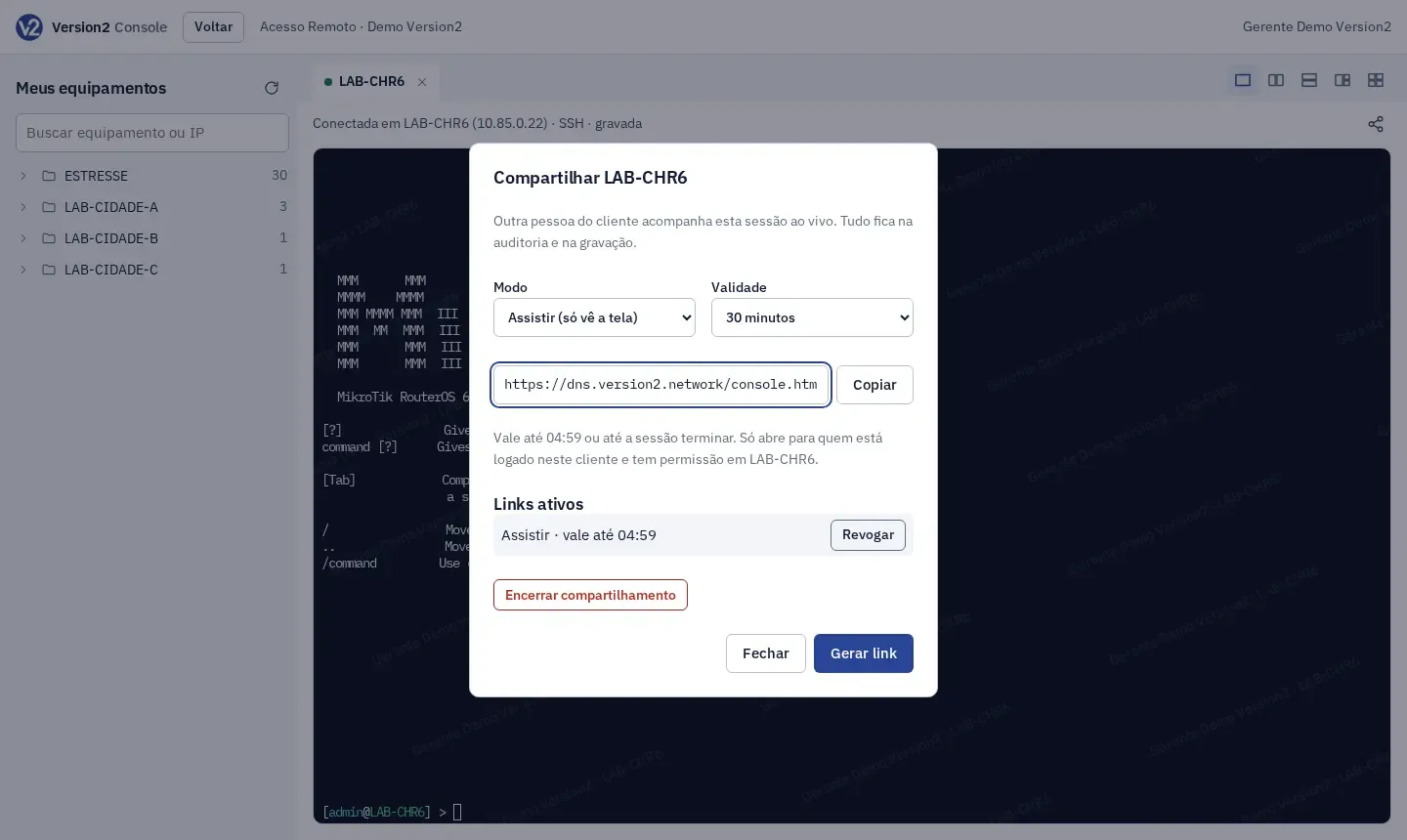
With the session open, click the share icon at the top right of the pane (in the console), or the Compartilhar button (on the terminal screen).
-
Choose the Modo:
- Assistir: the person sees the screen but cannot type.
- Participar: the person sees and types in the same session.
-
Choose how long the link is valid (Validade): 15, 30 or 60 minutes.
-
Click Gerar link, then Copiar. Send the link to the person.
-
The person opens the link while signed in to the panel. The session shows up in a tab of their console. If the device asks for an authenticator code, they type their own code.
-
A Sessão compartilhada com … banner appears above the session, for you and for whoever joined, with each person’s name and mode.
-
To see who is in the session, click the share icon again, or Compartilhada on the terminal screen (the number shows how many people joined). From there you can:
- Tirar da sessão: remove a person (they cannot come back with the same link);
- Revogar: revoke a link that has not been used yet;
- Encerrar compartilhamento: revoke every link and remove everyone.
Expected result
Section titled “Expected result”People who join see the same output as you, live, with their own name in the watermark. In participate mode, what they type goes to the device, goes through their own command filters and is marked in the recording with the name of who typed it. Joining, leaving, and links created and revoked are kept in the audit log.
The link stops working when it expires, when you revoke it or when the session ends. If you end the session, it ends for everyone.
WinBox and RDP
Section titled “WinBox and RDP”A graphic session is shared the same way, with the share icon at the top of the pane.
- People who join see the same screen as you, live, with their own name in the watermark.
- Assistir (Watch): the person only sees. Their mouse and keyboard don’t reach the device.
- Participar (Participate): the person uses the mouse and keyboard on the same screen as you. Only you change the desktop size.
- There is still a single recording, the one of your session, with everything shown on the screen.
- The list of people in the session refreshes every few seconds.
In every session type, the permission of people who joined is checked again while they are inside. If the Manager removes their permission on the device, they leave the session and this is kept in the audit log.
If something goes wrong
Section titled “If something goes wrong”- “Link inválido, vencido ou revogado.” Ask the person who shared for a new link.
- “Você não tem permissão neste equipamento…” The person needs an access rule on the device. Ask the Manager.
- “Quem compartilhou tirou você desta sessão.” Ask for a new link if needed.
- “Sua permissão neste equipamento foi retirada…” (Your permission on this device was removed.) The person’s access rule changed. Ask the Manager if needed.