
Blocking
Register a blocking order so your servers stop resolving the listed domains.
Who can: view and look up, anyone with Ver (View) on DNS Recursivo. Create, activate and revoke, anyone with Escrever (Write). Delete an active or revoked list, anyone with Total (Full).
Step by step
Section titled “Step by step”-
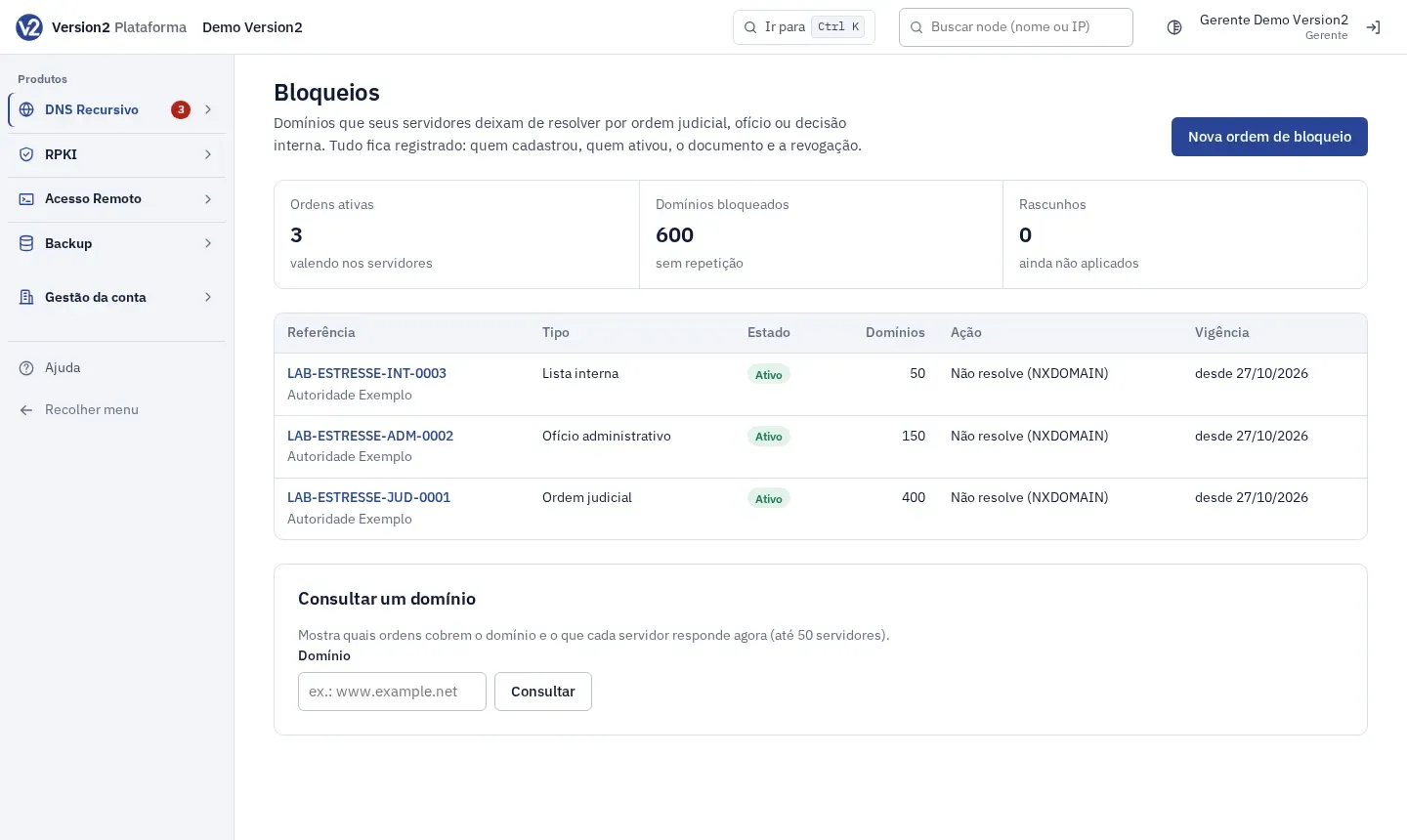
Open Bloqueios (Blocking). The screen shows Ordens ativas (Active orders), Domínios bloqueados (Blocked domains), Rascunhos (Drafts) and the list of orders.
-
Click Nova ordem de bloqueio (New blocking order).
-
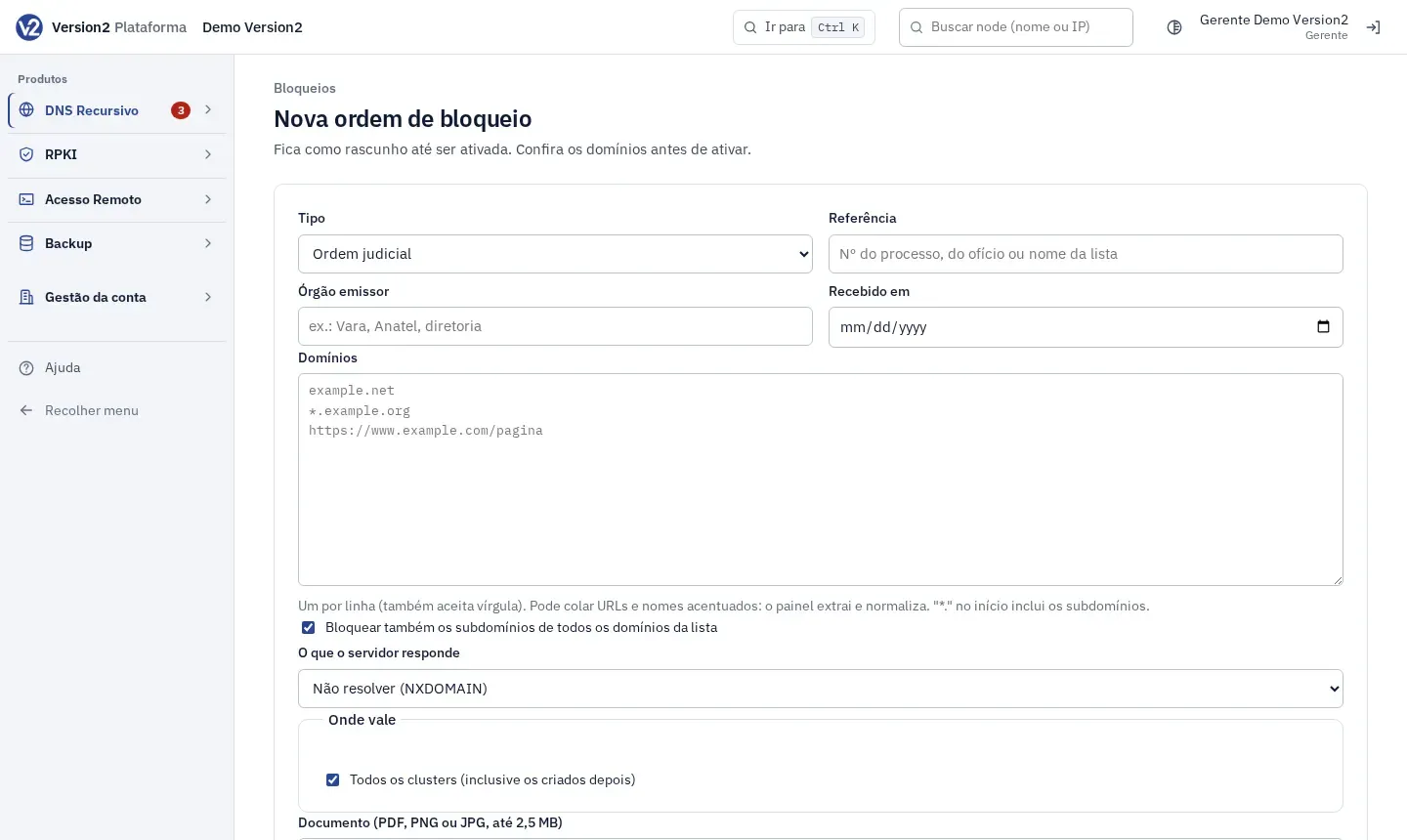
Fill in Tipo (Type: Ordem judicial, Ofício administrativo or Lista interna, that is court order, administrative notice or internal list), Referência (Reference: case number, notice number or list name), Órgão emissor (Issuing body) and Recebido em (Received on).
-
In Domínios (Domains), paste one per line (commas also work). URLs and accented names are normalized. A leading “*.” includes the subdomains. The option Bloquear também os subdomínios de todos os domínios da lista (Also block subdomains of every domain in the list) applies to the whole list.
-
In O que o servidor responde (What the server answers), choose Não resolver (NXDOMAIN) (Do not resolve) or Responder com o IP de uma página de aviso (Answer with the IP of a notice page) and fill in IPv4 da página de aviso and IPv6 da página de aviso (Notice page IPv4 / IPv6, e.g. 192.0.2.80).
-
In Onde vale (Where it applies), leave Todos os clusters (inclusive os criados depois) (All clusters, including ones created later) or pick the clusters.
-
Attach the Documento (PDF, PNG ou JPG, até 2,5 MB) (Document, PDF, PNG or JPG, up to 2.5 MB) and, if you want, Observações (Notes). Click Criar rascunho (Create draft).
-
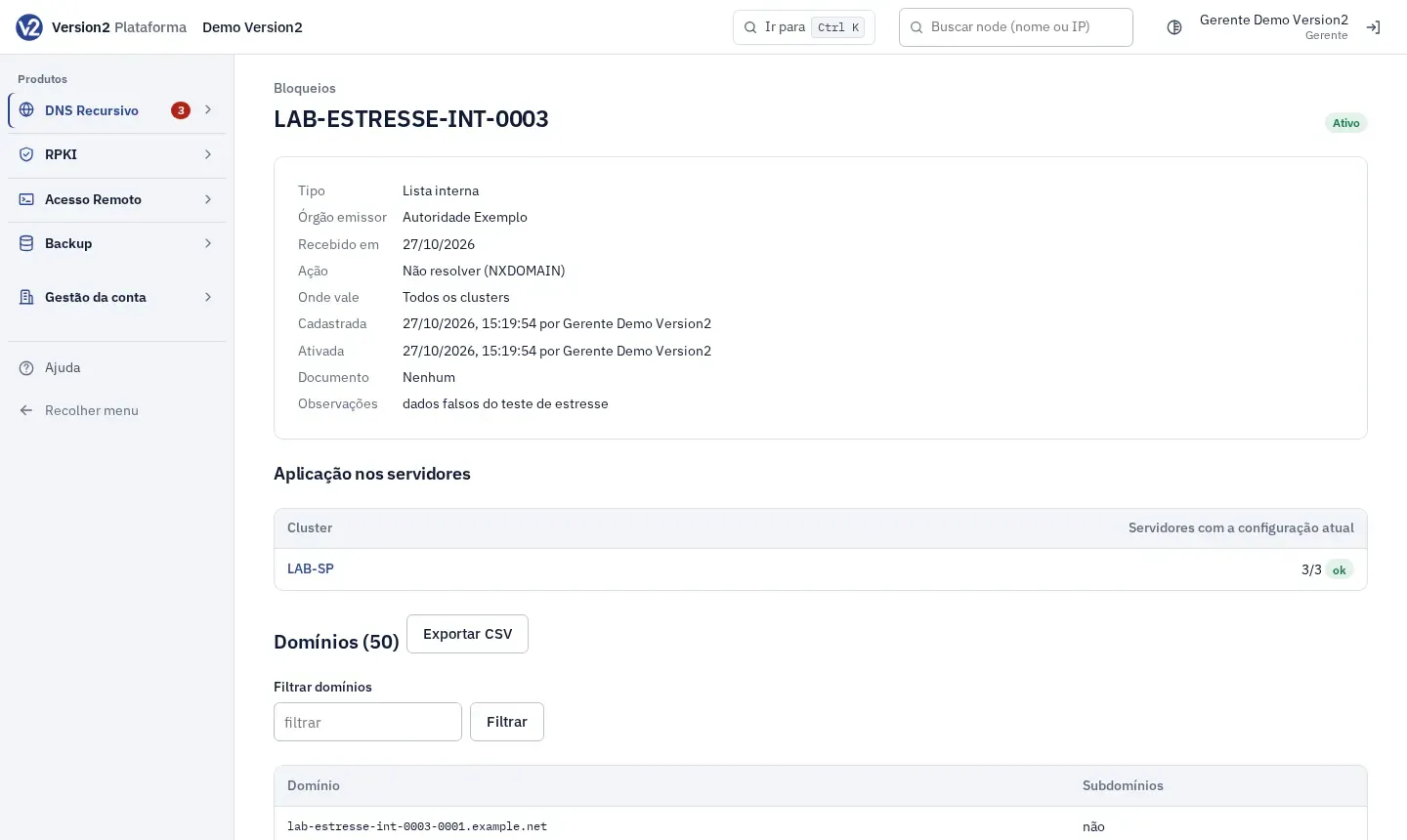
On the order page, check the data and the domains. A draft can be changed in Editar (Edit) or deleted with Apagar rascunho (Delete draft).
-
Click Ativar bloqueio (Activate blocking) and confirm.
-
To lift the block, fill in Motivo (Reason) under Revogar (Revoke) and click Revogar ordem (Revoke order). The domains resolve again and the order stays in the history.
-
To delete an active or revoked list for good, click Excluir lista (Delete list) and write the reason. The audit log keeps a summary of what was there.
Look up a domain
Section titled “Look up a domain”- In Consultar um domínio (Look up a domain), type the domain (e.g. www.example.net) and click Consultar (Look up).
- The panel shows which orders contain the domain and what each server answers right now (up to 50 servers).
Expected result
Section titled “Expected result”Once active, the Aplicação nos servidores (Applied on servers) table shows, per cluster, how many servers already have the current configuration. Nothing is deleted after activation, except by deletion with a reason. Exportar CSV (Export CSV) downloads the domain list.
If something goes wrong
Section titled “If something goes wrong”- “Informe o número do processo, do ofício ou um nome para a lista (até 200 caracteres).” (Enter the case number, notice number or a name for the list, up to 200 characters.) Fill in Referência.
- “Domínio inválido: …” (Invalid domain) or “A ordem não tem domínios.” (The order has no domains.) Fix the domain shown or paste at least one in Domínios.
- “Escolha ao menos um grupo, ou aplique em todos.” (Choose at least one group, or apply to all.) Check a cluster in Onde vale or leave all of them.
- “Envie o documento em PDF, PNG ou JPG.” (Send the document as PDF, PNG or JPG.) or “Arquivo grande demais. Limite: 2,5 MB.” (File too large. Limit: 2.5 MB.) Convert or shrink the file.
- “Só rascunhos podem ser alterados. Para mudar uma ordem ativa, revogue e cadastre a nova.” (Only drafts can be changed. To change an active order, revoke it and register a new one.)
- “Informe o motivo da revogação (ex.: decisão revogada no processo, prazo encerrado).” (Enter the reason for revocation, e.g. decision overturned, term ended.) Fill in Motivo.
- You are an Editor and the activation became a request: with approval turned on, activating and revoking wait for a Manager. See Approvals.