
Recursive DNS concepts
Understand the parts of Recursive DNS before you configure it.
Who can: anyone with Ver (View) on DNS Recursivo.
The parts
Section titled “The parts”- Node: a DNS server of yours (Debian 12, Debian 13 or Ubuntu 24.04 LTS), with BIND9, nftables and FRR installed by the install command. The panel is not a DNS server. It only configures and monitors the nodes.
- Agent: a program that runs on the node. It fetches the configuration from the platform, checks it before applying and goes back to the previous one if something goes wrong. It only opens outbound connections (HTTPS), so the terminal and the tests work even when the node has a private IP.
- DNS cluster: the set of nodes that share the same anycast IPs, authorized prefixes and policies. In the menu, it is under Clusters.
- Authorized prefixes: the networks allowed to query the cluster’s DNS. With no prefixes, the cluster’s DNS answers no one but the server itself.
- Anycast: the same IPs (on loopback lo1) announced by every node in the cluster, over OSPF or BGP. Subscribers use a single IP and the network takes the query to the closest node. If the local DNS on a node fails, the agent withdraws that node’s announcement. Without anycast, each node answers on its own unicast IP.
- Configuration generation: every change creates a new configuration. The first node applies it and the others follow after it confirms.
Step by step
Section titled “Step by step”-
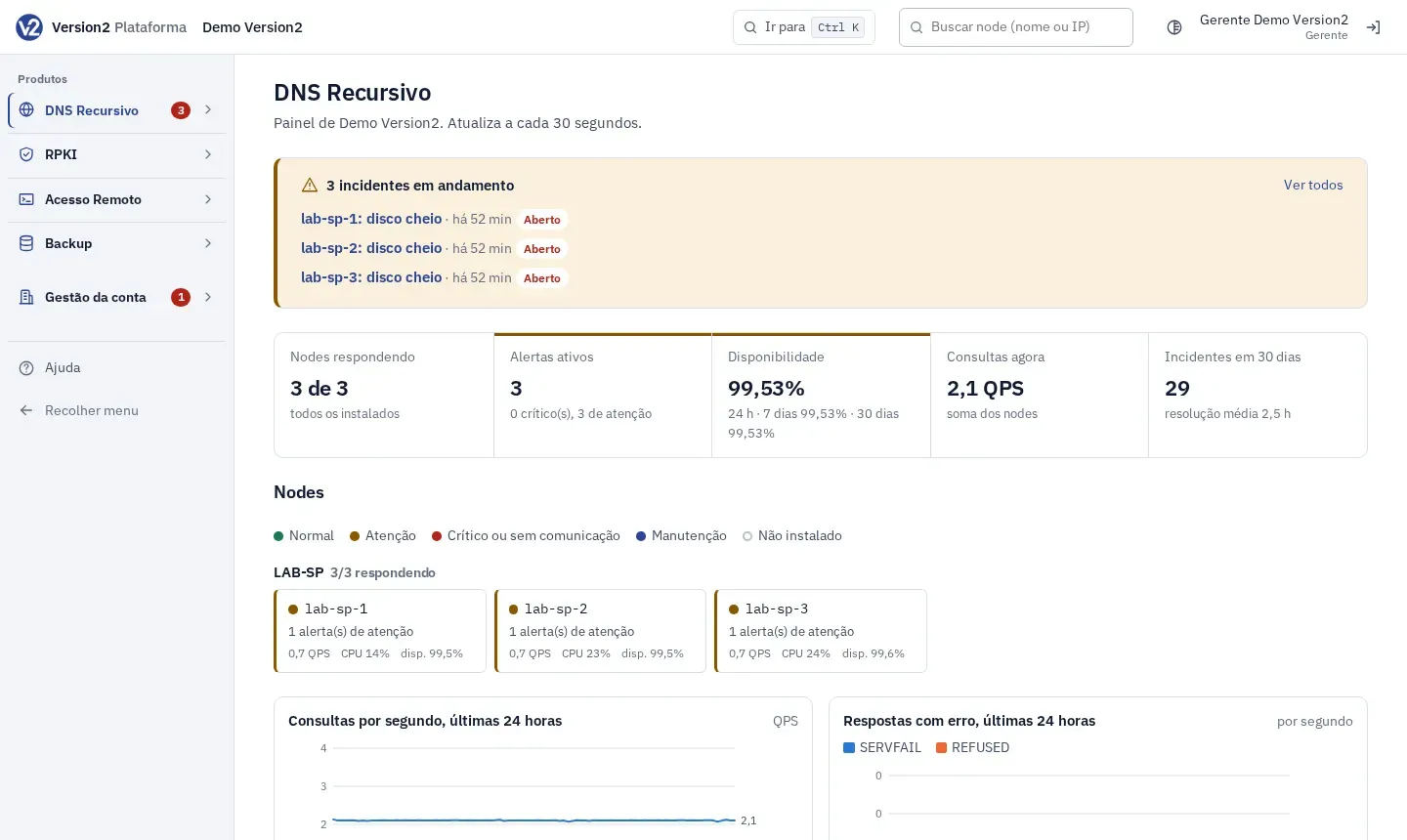
In the menu, open Produtos > DNS Recursivo (Products > Recursive DNS). Under Operação (Operations) you find Painel (Dashboard), Estatísticas (Statistics), Incidentes (Incidents) and Testar resolução (Test resolution). Under Rede (Network) you find Clusters, Nodes, Bloqueios (Blocking) and, for users with Total (Full), Captura de pacotes (Packet capture).
-
The Painel shows Nodes respondendo (Nodes responding), Alertas ativos (Active alerts), Disponibilidade (Availability), Consultas agora (Queries now), Incidentes em 30 dias (Incidents in 30 days), the node map, the charts for the last 24 hours and the cluster table. It refreshes every 30 seconds.
-
To find a node fast, use Buscar node (nome ou IP) (Search node, name or IP) at the top and press Enter.
Expected result
Section titled “Expected result”You know where the cluster, the nodes and anycast live, and what each status means.
If something goes wrong
Section titled “If something goes wrong”- You changed the groups and the nodes did not change: the account groups only organize items. The DNS cluster is what defines the node configuration.
- DNS does not answer subscribers: the cluster has no authorized prefixes. Add the prefixes before you point subscribers to it.