
Devices and schedule
Turn on configuration backup for routers and switches and decide when it runs and how long it keeps versions.
Who can do this: people with Total on Backup or who manage Remote Access. Everyone else sees “Você não tem acesso ao Backup.” (You don’t have access to Backup.) on the Backup screens.
How it works
Section titled “How it works”The panel logs in to the device over SSH, through the proxy, and exports the configuration with read-only commands only (export, show or display, never configuration mode). It uses the Usuário do backup (Backup user) if the device has one, or else the saved access credential. A new version is kept only when the configuration changes. On Huawei, a version is kept only when complete (ending in return); if it comes back cut, the backup fails with “a exportação veio incompleta” (the export came back incomplete). Backup uses the same devices as Remote Access.
Step by step
Section titled “Step by step”Turn on backup for a device
Section titled “Turn on backup for a device”-
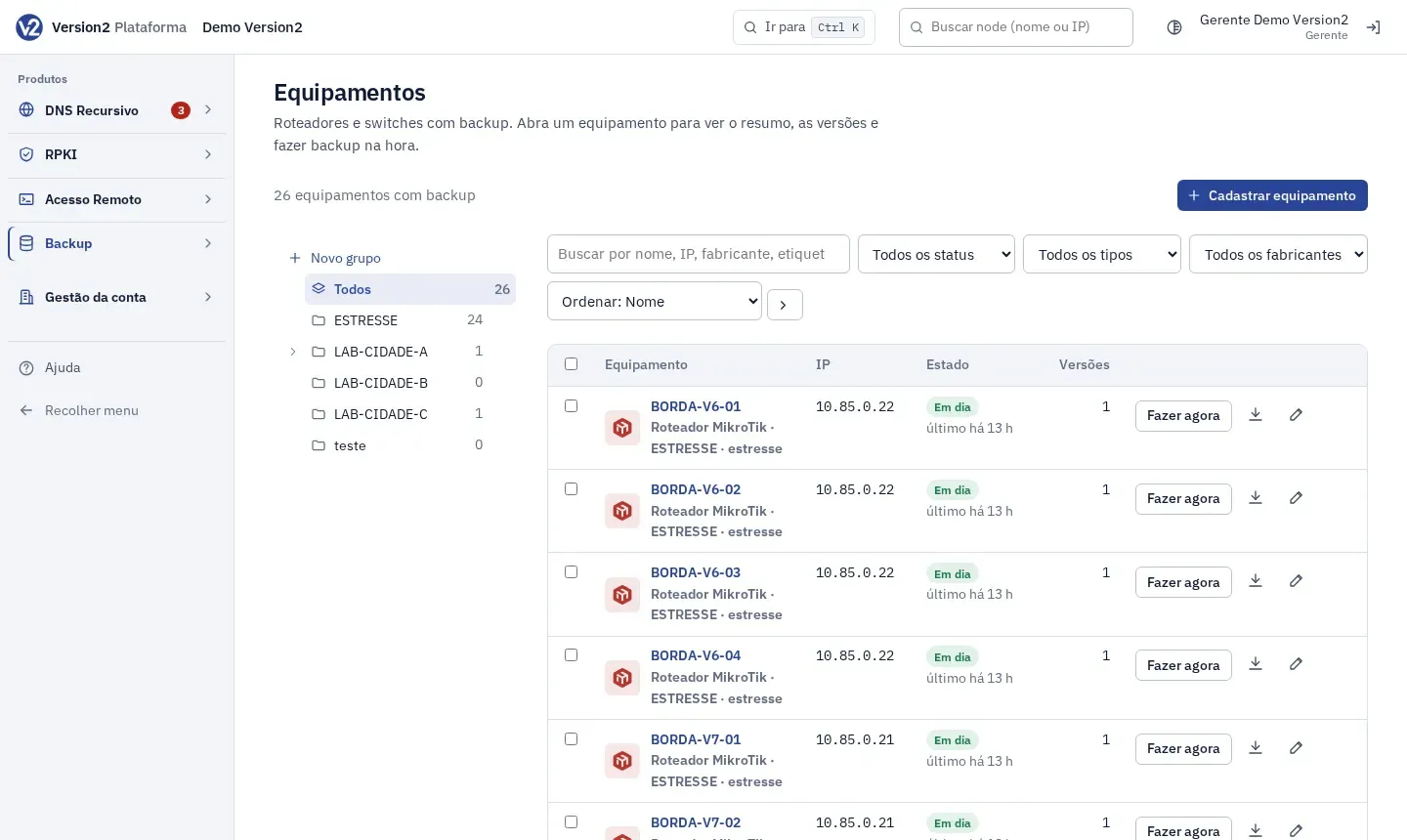
In the menu, open Produtos > Backup > Equipamentos (Products > Backup > Devices).
-
Click Cadastrar equipamento (Add device) or the Editar (Edit) icon of an existing device. The dialog is the same as in Remote Access.
-
Make sure SSH is on and there is a saved credential: the saved access Credencial (Credential) or, under Usuário do backup and Senha do backup (Backup user and password), a separate user for backups (for example, read-only). Leave both empty to use the access credential. Check Backup de configuração (precisa de SSH e de credencial salva: a de acesso ou a do backup) (Configuration backup, needs SSH and a saved credential) and click Salvar (Save).
-
In the list, use the search, the status, type and vendor filters, sorting and the group tree. To run several at once, check the devices and click Fazer backup agora (Back up now). On a row, Fazer agora (Run now) runs just that one. The header box checks every filtered device, and Editar em lote (Bulk edit) turns backup on or off, or changes the groups or the proxy, for all checked devices. See Edit several at once.
Status
Section titled “Status”| Status | Meaning |
|---|---|
| Em dia (Up to date) | Recent backup. |
| Atrasado (Late) | Past the schedule interval. |
| Falhou (Failed) | The last attempt failed. The reason shows below. |
| Desligado (Off) | Backup turned off on the device. |
| Na fila (Queued) | On, waiting for the first backup. |
| Sem leitor (No reader) | Vendor outside the ones backup can export. |
Set the schedule
Section titled “Set the schedule”-
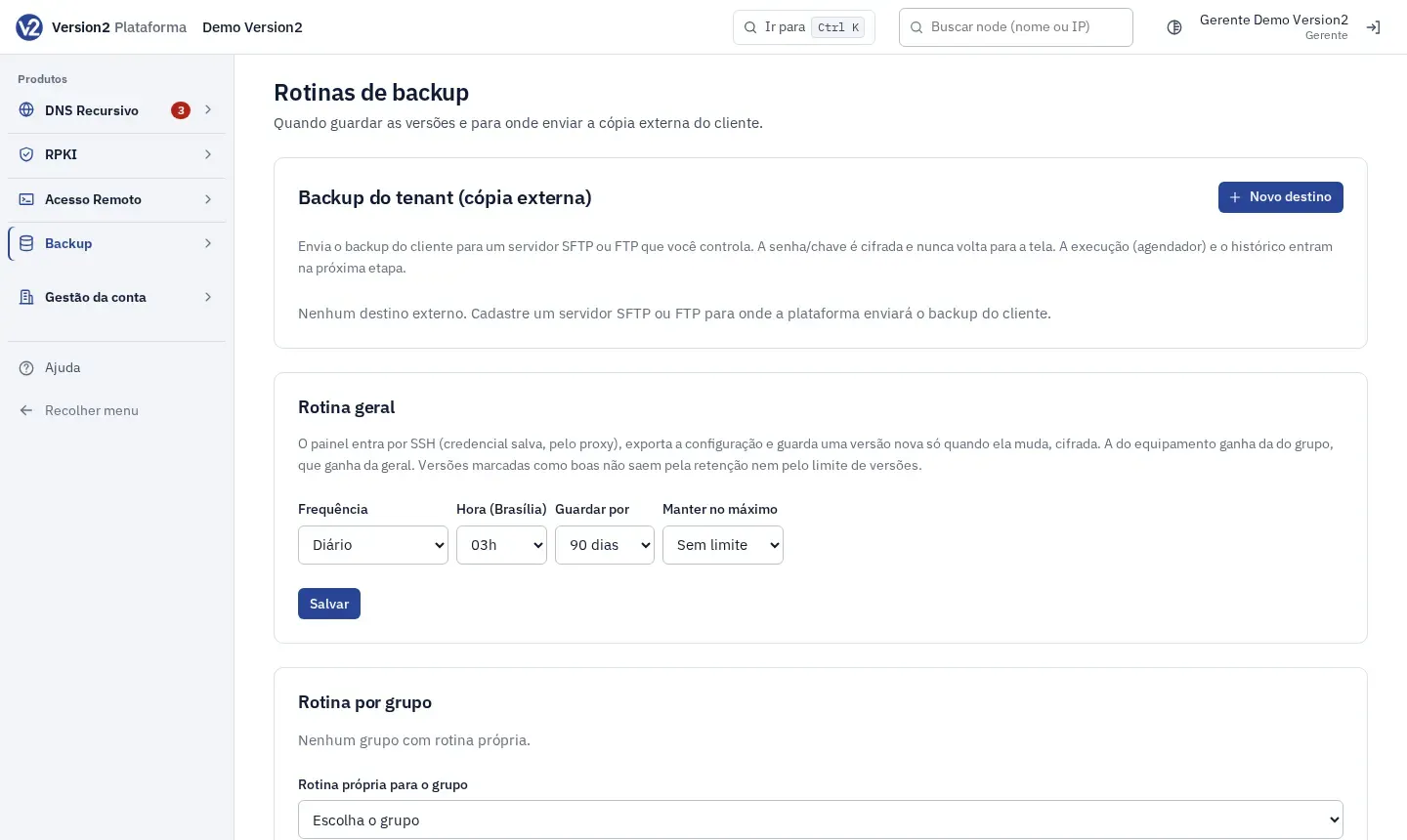
In the menu, open Backup > Rotinas (Schedules).
-
Under Rotina geral (General schedule), choose Frequência (Frequency: every hour, 2, 4, 6 or 12 hours, Diário (Daily) or Semanal (Weekly)), Hora (Brasília) (Time, Brasília; daily and weekly only), Guardar por (Keep for: 30, 90, 180 days or 1 year) and Manter no máximo (Keep at most: no limit or 5 to 100 versions). Click Salvar.
-
For a group, pick it in Rotina própria para o grupo (Group-specific schedule), adjust and click Salvar. For a critical device, use Rotina própria para o equipamento (Device-specific schedule). Voltar a herdar (Inherit again) removes the specific schedule.
Expected result
Section titled “Expected result”The Backup Visão geral (Overview) shows Backups guardados (Stored backups), Armazenamento (Storage), Em dia, Atrasados (Late), Com falha (Failed), Atividade (Activity) for the last 14 days, Precisam de atenção (Need attention) and Mudanças recentes (Recent changes). The device schedule takes precedence over the group schedule, and the group schedule over the general one. Versions marked as good are not removed by retention or by the version limit.
If something goes wrong
Section titled “If something goes wrong”- “Backup falhou: …” (Backup failed: …) Check the device credential, SSH and proxy.
- “O backup deste equipamento já está rodando.” (This device’s backup is already running.) Wait for it to finish and try again.
- “A rotina é por grupo ou por equipamento, não os dois.” (The schedule is per group or per device, not both.) Pick only one.
- The backup option is greyed out on the device form when the device has no SSH and saved credential (access or backup). Turn on SSH and fill in one of the two. Servers don’t have this option.
- “Informe a senha do usuário do backup. Ao trocar o usuário, a senha também precisa ser digitada.” (Enter the backup user’s password. When you change the user, the password must be typed too.) Fill in Senha do backup or clear Usuário do backup. When you change the user, the saved password belonged to the previous one: type the new user’s password.
- “a exportação veio incompleta” (the export came back incomplete) The Huawei device didn’t send the configuration up to the final
return. Check the proxy and try Fazer agora (Run now) again. - “Só quem tem Total no módulo Backup (ou gere o Acesso Remoto) pode mudar isto.” (Only people with Total on Backup, or who manage Remote Access, can change this.) Ask the Manager.